


AtoB: Find and Save on Fuel
4.6118.00 Reviews
App Specs
- Version
- 1.73.0
- Updated On
- License
- Free
- Downloads
- 10,000+
- Developer
- AtoB
- Categories
- Auto & Vehicles
- Platform
- Android
Screenshots
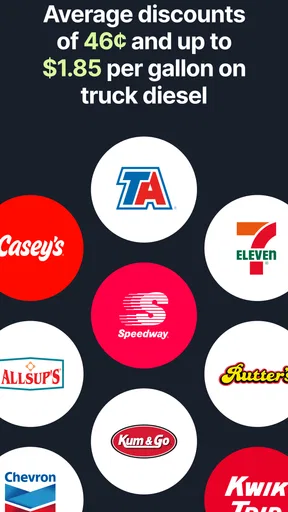
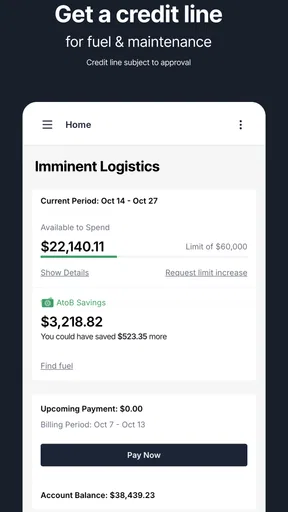
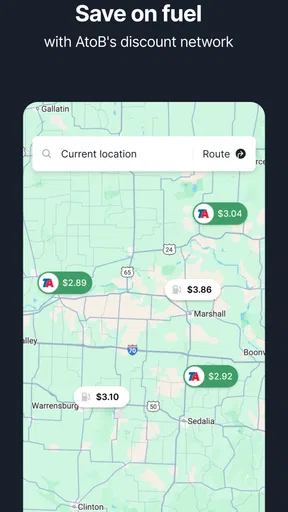
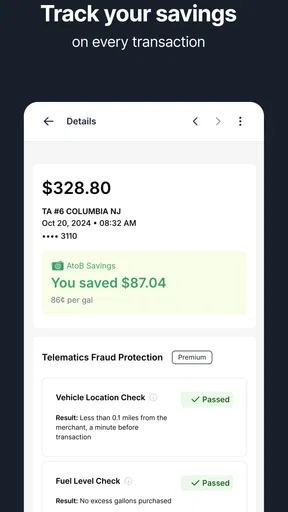
 Analysis by AppCompare
Fuel savings sound simple until they have to work during a real trip: a driver is moving between stops, the phone signal changes, prices need to be checked quickly, and there is little patience for a complicated process. I spent time looking at AtoB: Find and Save on Fuel from that practical angle. It is a free Auto & Vehicles app from AtoB, aimed at people who want a more economical way to handle fuel purchases rather than relying only on whichever station happens to be closest.
My first impression is that its value depends less on entertainment or visual polish and more on timing. When the app is connected and the information you need is available, it can fit naturally into a driver’s routine. When connectivity becomes uncertain, the experience requires more preparation and common sense. That makes this an app worth considering for frequent drivers, work vehicles, and anyone who regularly plans fuel stops, but it is not something I would treat as a complete replacement for navigation, payment, or basic trip planning.
How AtoB fits into a connected driving routine
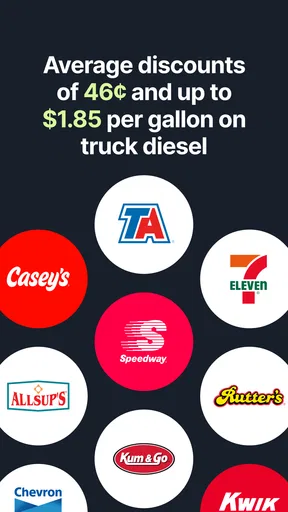
The central appeal is straightforward: AtoB is designed around helping users find fuel savings. That focus gives it a different role from a standard map app. A maps application is usually best at answering “where is the nearest station?” AtoB is more useful when the question is “how can I make this fuel stop cost less?” Those are related questions, but they are not identical, especially for drivers who cover many miles and can choose between several stops.
I would place it in the same practical category as other tools used before and during a journey: route planning, expense tracking, and vehicle support. The difference is that the fuel decision becomes the main task instead of a small detail inside a much larger navigation screen. That narrower purpose can be a strength. A driver who already knows the route may not want to search through a full navigation app just to think about fuel costs.
The app’s usefulness is naturally tied to an internet connection. Fuel-related information is the kind of content that can change, and a connected experience is important when the user is trying to make a current decision. I would therefore open it before pulling away, check the relevant information while safely parked, and avoid trying to operate it while driving. The app may support a quick decision, but it should not become a distraction behind the wheel.
That network dependence also changes how I would use it on a long journey. I would not wait until the tank is nearly empty and then expect the app to solve everything in a remote area. A better workflow is to check the next practical fuel opportunity while the phone has a stable connection, then continue driving with a clear plan. This is one of the less obvious lessons of using a connected fuel tool: the best moment to use it is often before the decision becomes urgent.
What happens when the connection is strong
With reliable mobile service, the app makes the most sense as a decision layer over an existing route. I can imagine checking it before leaving home, during a planned rest break, or while parked near a busy road with several fuel options. The important habit is to compare the saving with the effort required to reach the option. A cheaper stop is not automatically better if it adds a long detour, creates a difficult return to the route, or causes unnecessary waiting.
Worth Reading Before You Choose

EA SPORTS FC Mobile 26 Is a Bigger Football Game, but It Takes Time

Flipboard Shows What News Apps Must Do Beyond the Feed

Switching to Android Auto Means Rethinking Your Driving Routine

Google Calendar Makes a Crowded Week Easier to Manage

Ludo King Makes the Most of the Minutes Between Plans

Baby Panda World Brings Quick Play to Modern Phones, but Its Game Library Feels Busy
For a commuter, that might mean checking options before the evening drive rather than making a last-minute choice. For a delivery driver, it could be part of planning a sequence of stops. For a family trip, one person can review the next fuel decision while the vehicle is stationary. In each case, the app is most useful when it reduces uncertainty without asking the driver to constantly monitor a screen.
I also like the idea of separating fuel research from navigation. AtoB can help with the financial side of the choice, while the phone’s usual map or navigation tool can handle the road instructions. That division avoids expecting one app to do every job equally well. It also means I would verify the final route independently instead of assuming that a fuel-focused app should be my only source for traffic, road closures, or turn-by-turn guidance.
There is a practical trade-off here. A dedicated fuel-saving app can be more focused than a general map, but it may require an extra step. I have to look at one tool for savings and another for the route, then decide whether the difference is worth it. For someone who fills up in the same place every week, that may feel unnecessary. For someone who drives across different areas or manages fuel as a recurring expense, the extra step can make more sense.
Using it in mobile contexts without creating risk
AtoB is built for a phone-based situation, but that does not mean it should be used freely while the vehicle is moving. In my view, the safest routine is simple: decide when to check it, pull over or use it before departure, and finish the comparison before rejoining traffic. This matters even more when the phone is also running navigation, receiving calls, or handling other alerts.
The app is a better match for drivers who can plan a short pause than for someone who wants instant decisions at every intersection. A taxi or delivery professional may find value in checking during an existing stop. A private driver can use it when leaving work or before a weekend trip. Someone driving continuously through unfamiliar roads may prefer to make a fuel plan in advance and use the app only at safe stops.
My most useful mobile workflow would be to check three things together: whether the saving is meaningful, whether the station fits the route, and whether the fuel level allows flexibility. That last point is easy to overlook. Chasing a better price while running low can create more stress than it saves. I would rather accept a convenient option than turn a modest discount into a risky detour.
Screen size also affects the experience. A phone is convenient because it is always close, but a larger display may make comparisons easier when parked. I would not judge the app solely by how quickly it can be opened. The real test is whether the information can be understood at a glance before driving resumes. If I need to repeatedly zoom, switch screens, or remember several details, I would make the decision while stationary instead of trying to manage it on the road.
When connectivity fails or information is interrupted
The biggest practical limitation is the possibility of a weak or interrupted connection. Roads through rural areas, underground parking, crowded events, and busy roadside locations can all make phone-based services less dependable. I would not assume that a previously viewed screen will remain sufficient for every later decision, particularly when the trip has changed or the fuel plan needs updating.
My recovery approach would be deliberately low-tech. Before leaving a connected area, I would note the next realistic fuel stop and keep enough fuel in reserve to reach an alternative. If the app becomes difficult to use, I would switch to the normal map app, road signs, or a known station rather than repeatedly refreshing while driving. The saving is useful only if the process remains safe and practical.
This is also where AtoB should not be confused with a full emergency tool. I would not rely on it as the only plan when the tank is nearly empty, the route is unfamiliar, or the phone battery is low. A fuel-saving service can support a decision, but it cannot remove the normal risks of travel. Keeping a basic backup plan is not a criticism of the app; it is sensible behavior for any connected service used on the road.
Recovery is easier when the user has already separated “preferred option” from “acceptable option.” I might choose one station because it offers the best saving, but I would also know which nearby or route-friendly alternative is good enough. That approach prevents a temporary connection problem from turning into a long delay. It is a small planning habit, yet it makes the app feel more useful because I am using its information rather than becoming dependent on it.
Another point is that a failed connection does not necessarily mean the whole journey has failed. If I checked the app earlier and made a sensible plan, I can continue without constantly reopening it. The app works best as part of a broader routine, not as a live command center that must be consulted at every stage of a trip.
Keeping fuel research sensible on mobile data
Because this is a connected app, I would use it thoughtfully when mobile data is limited. I would avoid opening it repeatedly just to confirm the same decision. One careful check before departure, followed by another at a planned stop if circumstances change, is more sensible than refreshing throughout the journey. This also reduces distraction and keeps the process focused.
Wi-Fi can be useful for planning a longer journey before leaving, while a mobile connection is more practical for a change made on the road. I would not make assumptions about how much data the app uses, because that can depend on the session and the phone environment. Instead, I would watch my own usage during the first few trips and adjust my habits. The important point is not to treat a fuel-saving tool as something that needs constant background attention.
Battery planning matters in the same way. A phone used for navigation, calls, music, and fuel research can lose power faster than expected. I would keep a charger available and avoid using the app as a reason to leave the screen active for long periods. Checking, deciding, and closing it is a better pattern than leaving several apps running while driving.
There is also a financial judgment that data-conscious users should make: the saving has to justify the effort. If a small difference requires a lengthy detour, extra data use, and more time, it may not be a real saving once the whole journey is considered. I would use AtoB to improve decisions, not to chase every possible discount regardless of distance or convenience.
Who will get the most from it
The strongest audience is made up of people who buy fuel regularly and have some control over where they stop. High-mileage commuters, independent drivers, service workers, and small business operators may appreciate a tool that keeps fuel costs in view. It can also help households that want to compare options before a long trip instead of choosing automatically at the first station.
The app is less compelling for someone who rarely drives, always uses the same nearby station, or has no practical choice about where to refuel. It may also be a poor fit for a driver who wants one application to provide navigation, traffic, vehicle maintenance, and fuel management together. A general map app may be more convenient in that case, even if it is less focused on fuel savings.
I would also skip it for urgent situations where the priority is simply reaching the nearest suitable station. When the tank is low, the route is changing quickly, or the connection is unreliable, convenience and safety matter more than finding the best possible deal. The app adds the most value when there is time to compare rather than pressure to act immediately.
Everyday scenario: making one fuel stop less wasteful
Imagine I am leaving work for a longer drive and know I will need fuel before reaching home. Instead of waiting until the warning light appears, I check AtoB while parked. I compare the available saving with the direction of travel, then use my usual navigation tool to confirm that the selected stop does not create an awkward detour. If the connection is stable, I make the decision and close the fuel app.
During the trip, I would not keep checking for a theoretically better option. If traffic changes or the planned stop becomes inconvenient, I would reassess at a safe break. If the connection disappears, I would use the backup option I had already identified. This scenario shows the app’s real strength: it can improve a normal decision when used at the right time, but it does not eliminate the need for route awareness or judgment.
For a professional driver, the same idea can be repeated across a working day, although the value depends on how much flexibility the route allows. The time spent checking must stay brief, and the driver should make decisions while stationary. For a family, the app can be part of trip preparation, with the passenger handling the comparison while the driver concentrates on the road.
What the app’s current profile suggests
AtoB has been available since June 30, 2022, and its current version is 1.73.0. It works on Android 7.0 or later, which gives it a broad compatibility range for people who keep an older phone in the car. The age rating is Everyone, so it is presented as a general-purpose vehicle app rather than something restricted to adults.
Its reception is encouraging without being a reason to stop thinking critically: the app holds a 4.6 average from around 660 ratings, with more than a hundred written reviews. It has passed 10 thousand installs, which suggests a real user base while still making it feel more specialized than a mainstream navigation platform. I read those figures as evidence of interest, not proof that every driver will find the workflow ideal.
The free price lowers the barrier to trying it. That matters for an app whose usefulness depends on personal driving habits. Someone can test it across familiar and unfamiliar routes, then decide whether the extra planning step genuinely helps. I would judge it over several ordinary fuel stops rather than one quick opening, because the benefit appears in repeated decisions rather than in a single screen.
My connectivity verdict
After looking at AtoB through the lens of network-dependent driving, I see it as a focused companion rather than a complete travel system. Its best use is connected planning: check fuel options while parked, compare the saving with the route, and keep a practical alternative in mind. That workflow respects both the app’s purpose and the realities of mobile coverage.
The most important habit is to use the app before the fuel decision becomes urgent. Doing that makes connection problems easier to handle, reduces screen time on the road, and prevents a small saving from becoming an inconvenient detour. It also lets AtoB complement a map app instead of competing with it.
I would recommend trying it if fuel costs are a regular concern and your journeys give you some choice about where to stop. I would not recommend depending on it alone for emergency refueling, continuous navigation, or trips where connectivity is routinely poor. For the right driver, AtoB offers a practical way to make fuel planning more deliberate, and its free availability makes testing that idea straightforward.
Overall, AtoB: Find and Save on Fuel earns its place on my phone when I am planning ahead, not when I am already rushing. It is a specialized fuel-saving app from AtoB with a clear everyday purpose, useful compatibility, and a sensible role alongside familiar navigation tools. Its limitations are mainly about context: the value drops when the network, battery, time, or route leaves no room for comparison. Used with that understanding, it can turn an ordinary fuel stop into a better-informed choice.
Pros
- Compares fuel prices nearby to help identify cheaper refueling options.
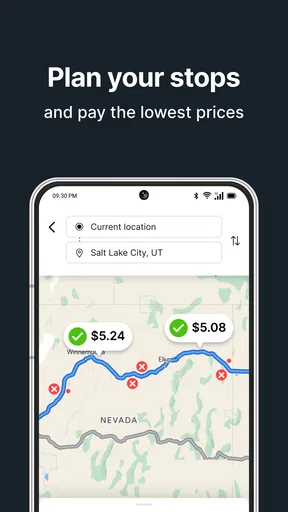
- Supports route planning with fuel stops along the journey.
- Simple map interface makes nearby stations easy to locate.
- Can help reduce travel costs for frequent drivers.
- Useful for checking prices before committing to a station.
Cons
- Fuel prices may be outdated if stations have not recently reported changes.
- Coverage and accuracy can vary significantly by location.
- Some features may require location access while the app is in use.
- Savings depend on nearby stations offering genuinely lower prices.
- Background location use may increase battery consumption during long trips.
FAQs for AtoB: Find and Save on Fuel
What is AtoB: Find and Save on Fuel?
AtoB: Find and Save on Fuel is a mobile app designed to help drivers locate nearby fuel stations and compare available fuel prices. It can be useful when planning a trip, searching for a cheaper place to refuel, or checking station details before arriving. Availability of prices, stations, and features may vary depending on your location and the data provided by local sources.
How does AtoB help users save money on fuel?
The app can help reduce fuel expenses by showing nearby stations and highlighting price differences between them. After entering or allowing access to your location, you can compare options and choose a station that offers a more convenient price or route. Actual savings depend on fuel prices being current, the distance to the station, traffic, and your vehicle’s fuel consumption.
Does AtoB provide real-time fuel prices and station information?
AtoB may display fuel prices, station locations, opening information, and other details, but users should not assume that every listing is updated instantly. Prices can change frequently, and information may come from third-party or community-supported sources. Before making a special trip, it is sensible to verify the price and station availability when possible, especially in unfamiliar areas.
Does AtoB require location access, and is it safe to use?
Location access is generally important for an app focused on finding nearby fuel stations and presenting relevant results. You can usually manage this permission through your Android or iOS settings, choosing options such as approximate location or access only while using the app, depending on the platform. Review the app’s privacy policy and grant only permissions you consider necessary.
Is AtoB: Find and Save on Fuel free to download and use?
The app may be available to download without an upfront charge, but the exact pricing model can depend on the version, platform, country, and any optional features introduced by the developer. Check the Google Play Store or Apple App Store listing before installing to review subscriptions, in-app purchases, advertising, and supported devices. Also confirm recent user reviews and the latest update details.


